The Very Basics
Let's do the thing. First of all, make sure you have a desktop computer or laptop (I'm just going to say "desktop" from now on to save time); you can technically follow along using a mobile phone or iPad but, for the time being, this guide won't cover how to do that. If you don't own a desktop, pretty much every public library will have some that you can use for free.
The first thing you'll need to do is create a folder on your computer, which will contain all the files for your website. If you don't have any experience working with files and folders, now is a good time to learn!
Setting Up Your Website
Windows
- Open File Explorer and find a place for the local version of your new site. At this stage, it doesn't matter where; your Documents folder is pretty solid.
- Right click and press "New..." -> "Folder" to create a folder to contain all the website's contents. Give it an appropriate name.
- Enter this folder, then right-click and create a new text document with "New..." -> "Text Document". Call it
index.html. This will be your homepage. You might have to go into it and save it as an HTML file in Notepad to make sure it is actually an HTML file, because by default, Windows is evil and doesn't let you see file extensions. Make sure to delete the original text file if using this approach. If you do it via renaming, Windows will ask you if you want to change the file type, and believe me, you very much do. Text documents aren't very useful on the World Wide Web Tee Em, unless they're encased in HTML. - Right-click (yeah i know, there's a lot of this) your new .html file, and select "Open with..." -> "Notepad", and watch as your blank HTML file appears magically before your eyes as a notepad document containing absolutely nothing. This is absolutely fine.
- If you type things into this and save them, it will save to the HTML file quite happily, though Notepad isn't exactly the best editor for this... see later for details.
macOS
- Open the Finder and pick a folder to place your new site into (it doesn't really matter where, "Documents" is a solid choice).
- Press ⌘ + Shift + N to create a new folder.
- Give it a name and press return.
- Now, open TextEdit.
- If it doesn't start a new document automatically, click "New Document" or press ⌘ + N to do that.
- HTML is a plain text format, so we need to go to Format > Make Plain Text (or press ⌘ + Shift + T) to make TextEdit treat it as such.
- Go to File > Save (or press ⌘ + S) to save the file. It should pop open a dialog asking you where to save the file.
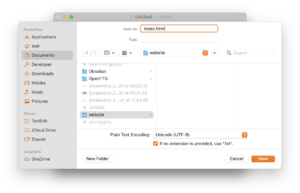
This is roughly what you want it to look like - Where it says "Save as:", type
index.html. In the "Where:" field, navigate to the folder you created earlier (you might need to click the little down arrow to get a proper file picker). - Click Save. If it interrogates you about the .html extension, select "Use .html".
- You're ready to start editing your website!

Linux
fuuckkk... uuhhhh.. okay. uh
So there are a lot of different Linuxes and they're all slightly different in completely inscrutable ways, so it's going to be difficult to be as precise as you would with other platforms. I am going to assume that, because you're using the fucking nerd operating system for fucking nerds, you know how to create files and open a text editor on your specific flavour of Linux.
- Create a folder somewhere on your computer
- Open a text editor (such as Kwrite, Mousepad, uh, Text Editor) and create a new document
- Save the document as index.html within the folder you just created
Haiku
- Find a folder to place your new site into (your home folder will work fine).
- Create a new folder, call it whatever you want.
- Open that folder, right click and select
New→text fileand call itindex.html. This will be your site's homepage. - Right click the newly created file and select
Add-ons→FileType. - In the window that appears, type
text/htmlinto the "File Type" field and then close it. - You can now right click and open your new file in a text editor like Pe (not StyledEdit).
Note that WebPositive's developer tools are currently fairly lacking, so you may want to install a browser like Falkon from the HaikuDepot.
Adding Things

At this point, you should have a folder with a file called "index.html" inside it.[1] You can double click the file in the FinderFile Exploreryour file managerthe Tracker or drag its icon onto the "new tab" button on your web browser. You should see an entirely blank page. We haven't put anything in the file yet, so that makes sense.
Let's put some stuff on our page. For the rest of the guide I'll be making my website about my two cats, but you can of course make your website about anything you want.
Switch back to TextEditNotepadwhatever text editor you're usingPe and just start typing some stuff:
Hello! This is the homepage of Basil & Onion. They are the swamp creatures that live in my house.
Press ⌘ + SCtrl + SAlt + S to save and then reload the page in your web browser. Hopefully, what you wrote should show up on the page!

Next Up
- Tired of TextEditNotepad yet? Now is a good time install a nicer text editor.
- Start adding interesting things using HTML.
- Publish your site so that other people can see it.